Rabu, 17 November 2010

CCNA Discovery 2 Module 6 Exam Answers Version 4.0

CCNA Discovery 2 Module 6 Exam Answers Version 4.0

1. Which command is used to view the RIP routing protocol settings and configuration?
• show version
• show ip route
• show interface
• show ip protocols

2.
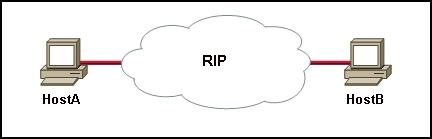
1
Refer to the exhibit. What is the maximum number of RIP routers that could separate HostA and HostB and still leave the hosts with connectivity to each other?
• 14
• 15
• 16
• 17

3. In which situation would a company register for its own autonomous system number (ASN)?
• when the company's ISP adds connection points to the Internet
• when additional routers are added to the corporate internetwork
• when more than one interior routing protocol is used
• when the company uses two or more ISPs

4. Consider this routing table entry
• R 172.16.1.0/24 [120/1] via 200.1.1.1 00:00:27 Serial0/1
• What type of route is this?
• a static route
• a default route
• a RIP route
• an OSPF route
• an EIGRP route
• a directly-connected route

5. What is the difference between interior and exterior routing protocols?
• Exterior routing protocols are only used by large ISPs. Interior routing protocols are used by small ISPs.
• Interior routing protocols are used to route on the Internet. Exterior routing protocols are used inside organizations.
• Exterior routing protocols are used to administer a single autonomous system. Interior routing protocols are used to administer several domains.
• Interior routing protocols are used to communicate within a single autonomous system. Exterior routing protocols are used to communicate between multiple autonomous systems.

6. What information is included in RIPv2 routing updates that is not included in RIPv1 updates?
• metric
• subnet mask
• area identification
• hop count
• autonomous system number

7. Which routing protocol is used to exchange data between two different ISPs?
• BGP
• EIGRP
• OSPF
• RIP v2

8.
2
Refer to the exhibit. Which configuration command or commands contributed to the output that is shown?
• routerA(config-router)# no version 2
• routerA(config)# interface fa0/0
• routerA(config-if)# ip address 172.19.0.0 255.255.0.0
• routerA(config-router)# network 192.168.3.0
• routerA(config)# no ip default-gateway

9.
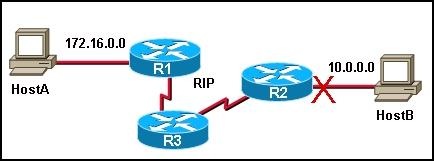
3
Refer to the exhibit. If all routers are running RIP and network 10.0.0.0 goes down, when will R3 learn that the network is no longer available?
• in 30 seconds
• in 60 seconds
• in 90 seconds
• Immediately

10. What statement is true regarding an AS number?
• AS numbers are controlled and registered for Internet use.
• Interior routing protocols require registered AS numbers.
• ISPs require all customers to have registered AS numbers.
• All routers at an ISP must be assigned the same AS number.

11. What is the purpose of the network command used when configuring RIP?
• to specify whether RIPv1 or RIPv2 will be used as the routing protocol
• to allow the router to monitor RIP updates that occur on other routers
• to identify which networks on the router will send and receive RIP updates
• to configure the IP address on an interface that will use RIP
• to identify all of the remote networks that should be reachable from the router

12. Which command would a network administrator use to determine if the routers in an enterprise have learned about a newly added network?
• router# show ip address
• router# show ip route
• router# show ip networks
• router# show ip interface brief
• router# debug ip protocol
• router# debug rip update

13. What is the purpose of a routing protocol?
• It is used to build and maintain ARP tables.
• It provides a method for segmenting and reassembling data packets.
• It allows an administrator to devise an addressing scheme for the network.
• It allows a router to share information about known networks with other routers.
• It provides a procedure for encoding and decoding data into bits for packet forwarding.

14. What device enables an ISP to connect with other ISPs to transfer data?
• border gateway router
• DSLAM
• web server
• interior router

15. Which command will display RIP routing updates as they are sent and received?
• show ip route
• show ip rip
• debug ip rip
• show ip protocols
• show ip rip database

16. Which part of an IP packet does the router use to make routing decisions?
• source IP address
• source MAC address
• destination IP address
• destination MAC address

17. What two types of businesses would benefit from registering as their own autonomous systems? (Choose two.)
• a home business with one ISP connection
• a global business with connections to multiple local ISPs
• a medium-sized nationwide business with Internet connectivity through different ISPs

• a large enterprise with two connections to the same ISP
• a small ISP with a single Internet connection through a larger ISP

18. Which command will display RIP activity as it occurs on a router?
• debug ip rip
• show ip route
• show ip interface
• show ip protocols
• debug ip rip config
• show ip rip database

19. Why is fast convergence desirable in networks that use dynamic routing protocols?
• Routers will not allow packets to be forwarded until the network has converged.
• Hosts are unable to access their gateway until the network has converged.
• Routers may make incorrect forwarding decisions until the network has converged.
• Routers will not allow configuration changes to be made until the network has converged.

20. Which two statements describe static routes? (Choose two.)
• They are created in interface configuration mode.
• They require manual reconfiguration to accommodate network changes.
• They automatically become the default gateway of the router.
• They are identified in the routing table with the prefix S
• They are automatically updated whenever an interface is reconfigured or shutdown.

21. Which two statements or sets of statements describe differences between link-state and distance vector routing protocols? (Choose two.)
• Link-state routing protocols routinely use more bandwidth for updates than do distance vector routing protocols.
• Distance vector routing protocols update all routers at one time. Link-state routing protocols update one router at a time.
• Link-state routers only know about directly connected routers. Distance vector routers know about every router in the network.
• Link-state routing protocols update when a change is made. A network using distance vector routing protocols only updates at a specific interval.

• Distance vector routing protocols have limited information about the entire network. Link state routing protocols know about all routers in the network.
• In case of similar topologies, networks using link-state routing protocols typically converge more rapidly than do networks using distance vector routing protocols.

22. Which protocol is an exterior routing protocol?
• BGP
• EIGRP
• OSPF
• RIP

23. Hosts on two separate subnets cannot communicate. The network administrator suspects a missing route in one of the routing tables. Which three commands can be used to help troubleshoot Layer 3 connectivity issues? (Choose three.)
• Ping
• show arp
• Traceroute
• show ip route

• show interface
• show cdp neighbor detail

24. What term refers to a group of networks that uses the same internal routing policies and is controlled by a single administrative authority?
• Internet
• intranet
• virtual private network
• autonomous system

Kamis, 11 November 2010

tugas ccna 2.4, 2.5

CCNA Discovery 2 Module 4 Exam Answers Version 4.0
1• 128
2• 11100111
3• 255
4• Many internal addresses can be translated to a single IP address using different port assignments.
5• Class A
6• Network administrators are free to select any public addresses to use for network devices that access the Internet
7• It is possible to determine which class an address belongs to by reading the first bit.
 • The number of bits used to identify the hosts is fixed by the class of the network.
8• 14
9• 192.168.32.255
10• The default gateway is on a different subnet from the host.
11• 128
12127 to 191
13• Class D
14• 192.168.1.0 through 192.168.1.127
15• 2001-0db8-3c55-0015-abcd-ff13
16• to provide a method for privately addressed LANs to participate in the Internet
17• The host IP address must be translated to an outside private address.
18• 64,000 and above
19• private IP address
20• improved security
  • improved router performance
  • decreased processor load

CCNA Discovery 2 Module 5 Exam Answers Version 4.0
1• SDM is used for in-band management only. The IOS CLI can be used for in-band and out-of-band management.
2• global configuration mode
3• enable mode and virtual terminal
4• Switch1(config)# interface fa0/1
Switch1(config-if)# ip address 192.168.2.64 255.255.255.192
• Switch1(config)# interface fa0/1
Switch1(config-if)# ip address 192.168.2.66 255.255.255.192
• Switch1(config)# interface vlan 1
Switch1(config-if)# ip address 192.168.2.126 255.255.255.192
Switch1(config-if)# no shutdown
5• blinks rapidly amber
6• X(config)# ip route 192.168.5.254 255.255.255.0 fastethernet 0/0
7• router# show startup-config
8• router configuration mode
9• Down Arrow
10• Router> enable
Router# configure terminal
Router(config)# hostname LAB_A
11• The administrator must go to the switch location and make a console connection to check these settings.
12• Frame Relay encapsulation
13• host name
• DHCP options
• domain name
14• View a list of commands entered in a previous session.
• Recall up to 15 command lines by default.

15• DNS server IP address
16• ATM
• CHAP
• Frame Relay

17• Router# show ip connections
18• modem
19• routing protocol
• connected interface of neighbor device
• device ID
20• noise cancellation in transmitted data
21• retains contents when power is removed
22• Router1(config)# interface S0/0/0
Router1(config-if)# ip address 64.100.0.125 255.255.255.252
Router1(config-if)# clock rate 64000
Router1(config-if)# no shutdown
23• The switch port is running at a different speed from the speed of the workstation NIC.
24• Global configuration mode can be accessed by entering the enable command.
25• Router(config-if)# no shutdown

Kamis, 04 November 2010

TUGAS CCNA DISCOVERY 2.1, 2.2, 2.3

CCNA Discovery 2 Module 1 Exam Answers Version 4.0

1. a.• the number of routers between the source and destination device
   b.• the IP address of the router nearest the destination device

2.• Ethernet
  • metro Ethernet
  • T3

3.
4.• echo reply issued by destination
5.• peers with other similarly sized ISPs to form the global Internet backbone
6.• on the ISP extranet
7.• the specifications and rules for how devices communicate over an IP network
8.• customer service
9.•  network operations
10.• network operations center
11.• a fixed number of interfaces
12,• Router# telnet 34.0.0.4
13.• traceroute
14.• satellite dishes
15.• megabytes per second
16.• planning and provisioning
17.• to document the development and approval of an Internet standard
18.• 2000
19.• voice communication
20.• help desk
   • computer support
   • application readiness

CCNA Discovery 2 Module 2 Exam Answers Version 4.0

1.• placing electrical signals on the medium for transmission
• encrypting and compressing data for transmission
2.• delivers data reliably across the network using TCP
3.• incorrect default gateway
4.• ping

• Telnet
• ipconfig
5.• source MAC address
• destination MAC address

6.• bits, frames, packets, segments
7.• conserving support resources
  • customer retention

8.• upgrading hardware and software
  • talking to the customer on the telephone
  • installing new equipment


9.• What is the IP address and subnet mask?
  • Can the default gateway be successfully pinged?
  • Is the Category 5 cable properly connected to the network slot on the PC?

10.• Is there a firewall installed on your computer?
11.• After trying unsuccessfully to fix a problem, the help desk technician sends the trouble ticket to the onsite support staff
12.• adding the hardware address
   • converting data to bits
   • routing packets

13.• What is your subnet mask?
   • What is your IP address?
   • Is the network cable correctly connected to the network port on the PC?
14.• A firewall filtering traffic addressed to TCP port 25 on an email server.
15.• configuring new equipment and software upgrades
   • surveying network conditions for further analysis

16.• Level 1

17.• identify and prioritize alternative solutions
18.• Is your PC configured to obtain addressing information using DHCP?

19 • improper IP address configuration on the host

20.• application, presentation, session

CCNA Discovery 2 Module 3 Exam Answers Version 4.0

1.• faster communication speeds
  • centralized cable management
2 • two users sharing the same computer
  • unlabeled cables
  • only two power outlets per wall in each room
3.• straight-through cable
  • crossover cable

4.• the memory requirements for installed application software

5.• access point
6 • Five percent of all network expense covers 99% of user requirements.
7.• the location of cables, computers, and other peripherals
  • the device names and Layer 3 addressing information
  • the location of routing, network address translation, and firewall filtering

8.• hub
9.• to verify that the report accurately describes the current network and any plans for expansion
10.• a networking device with ports that can be activated and deactivated
11 • manageability
12.• ISRs make routing decisions at OSI Layer 7, thus providing more intelligence to the network than do other routers.
13.• switches and routers
   • network equipment racks
   • the point of presence

14.• increases availability of help desk services
   • does not require a Service Level Agreement

15.• Phase 3 is based on an implementation schedule that allows extra time for unexpected events.
   • Phase 5 includes identifying and addressing any weaknesses in the design.


16.• upgrade the network operating system and all client operating systems
17.• intermediate distribution frame
18.• A=straight, B=straight, C=straight, D=crossover, E=console
19.• Staffing costs will increase because the customer will need to hire additional IT staff to complete the upgrade.
20.• fiber optic
21.• POP

Kamis, 28 Oktober 2010

Quis Capter 8 dan 9

1.       1.Drag the network threat on the left to the definition on the right.
a.       Data loss à destroying data on a hard drive
b.      Data manipulation à changing data for personal gain
c.       Disruption of service à overloading a server to reduce its performance
d.      Information theft à stealing data on a hard drive to gain a competitive advantage
e.      Identity à stealing information to impersonate someone and usually to obtain credit.

2.     2. How does a phisher typically contact a victim?
by  E-mail

3.       3.A file is downloaded from the internet. After the user opens the downloaded file, the user’s hard drive crashes and all information on the computer is lost. What type of attack occurred?
Virus

4.       4.In rapid succession, an intruder tries a large number of possibilities to guess passwords. As a result, other users on the network are locked out. What type of attack occurred?
Brute force

5.       5.What type of program installs and gathers personal information, including password and account information, from a computer without permission or knowledge of the user?
Spyware

6.       6. A network administration is troubleshooting a computer that is operating strangely. It boots slowly, programs will not load, and the keyboard responds very slowly. What is the best action for the administrator to take?
Boot the PC and Run anti-virus and anti-spyware applications from an external drive.

7.       7.Drag the term on left to the best description on the right.
a.       Stateful packet inspection à can look inside the packet up through layer 7
b.      Website filtering à allows or denies access based on a URL
c.       Simple packet filtering à allows or denies access based on an IP or MAC address
d.      NAT à keeps external users from knowing the IP Address used inside the network

8.       8.Drag the term on left to the definition on the right.
a.       Integrated à a feature of a network device such as a router.
b.      Personal firewall à an application designed to protect a home PC
c.       Appliance-based firewall à a device that has the sole function of being a firewall
d.      Server-based firewall à an application designed to protect the enterprise network

9.       9.What are three security features commonly found on an ISR? (Choose Three)
-          DMZ
-          NAT
-          SPI

10.   10.What are two purposes of a DMZ? (Choose two)
-          To create a network area that allows internal resources, such as a web server, to be accessed by external users.
-          To establish a network area where network resources can be shared by both internal and external users.

CCNA Discovery 1 Module 9 Exam Answers Version 4.0

1.• Ask the user what URL has been typed and what error message displays.
2.• divide-and-conquer
3.• Check the NIC, and then check the cabling.
4.• keeping spare switches, routers, and other equipment available
5.• hardware failure
   • loose cable connections
6. • ipconfig
7.• tracert
8.• netstat
9.• bottom-up 
10.• The ports have cables plugged in, but they are not functional. 
11.• The connectors at both ends of the cable are RJ-45. 
12.Refer to the graphic. What configuration is incorrect in the network shown
13.• SSID
• authentication
• encryption key
14.• configuring NAT
• broadcasting the SSID
• using open authentication
• using the default internal IP address
17.• default gateway
• dynamic IP address
• DNS server address
18.• router status page
• connectivity status as indicated by LEDs
19.• Ensure the correct cable is used.
• Ensure the link status LED on the integrated router is lit.
20.• after the network is installed and running optimally
• after major changes are implemented on the network
21.• identifying when the problem occurred
• implementing the solution to the problem
22.• Diagnostics can be run without a technician being present at the site.
23.• final resolution
• results of successful and unsuccessful troubleshooting steps


CCNA Discovery 1 Module 8 Exam Answers Version 4.0

1. • vishing
   • phishing
   • pretexting 
2. • by phone

3.
• Trojan horse

4.
• exploits vulnerabilities with the intent of propagating itself across a network


5.
• SYN flooding 
6. • popups

7.
• spam

8.
• acceptable use

9.
• Only after a virus is known can an anti-virus update be created for it. 
10 • When anti-spam software is loaded, legitimate e-mail may be classified as spam by mistake.

   • Even with anti-spam software installed, users should be careful when opening e-mail attachments.
 
11. • appliance-based
12. • DMZ 
13. • Only external traffic that is destined for specific internal ports is permitted. All other traffic is denied. 
14. • internal 
15. • to prevent outside intruders from attacking the router through the Internet

16.
• Internet access can be denied for specific days and times.


17.
• a large corporate environment 
18. • It identifies missing security updates on a computer. 
19. • Disable the wireless network when a vulnerability analysis is being performed.

20.
• a change of the default IP address

21.
• It requires that packets coming into the router be responses to internal host requests. 


Kamis, 21 Oktober 2010

Latihan 7

Nama : Ilham Tri Maulana
Nim : 06485
7.2.5 Configuring a wirelees Access Point
Step3

A.7.2.5 Configuring a Wireless Access Point
Step 1:
d)

Step 2: Log in to the multi-function device and configure the wireless network
e) SSID atau Service set identifier adalah tempat mengisikan nama dari access point yang akan disetting. Apabila klien komputer sedang mengakses kita misalnya dengan menggunakan super scan, maka nama yang akan timbul adalah nama SSID yang diisikan tersebut.

Step 3: Reflection
a) nirkabel, adalah teknologi yang menghubungkan dua piranti untuk bertukar data atau suara tanpa menggunakan media kabel.
b) Sebuah service set identifier (SSID) adalah urutan karakter yang unik nama jaringan area lokal nirkabel (WLAN). An SSID is sometimes referred to as a "network name." Sebuah SSID kadang-kadang disebut sebagai "nama jaringan." This name allows stations to connect to the desired network when multiple independent networks operate in the same physical area. Nama ini memungkinkan stasiun untuk terhubung ke jaringan yang diinginkan ketika beberapa jaringan independen beroperasi di wilayah fisik yang sama.
Each set of wireless devices communicating directly with each other is called a basic service set (BSS). Setiap set perangkat nirkabel berkomunikasi langsung satu sama lain disebut service set dasar (BSS). Several BSSs can be joined together to form one logical WLAN segment, referred to as an extended service set (ESS). Beberapa BSSs bisa bergabung bersama untuk membentuk satu segmen WLAN logis, disebut sebagai service set diperluas (ESS). A Service Set Identifer (SSID) is simply the 1-32 byte alphanumeric name given to each ESS. Service Set Identifer (SSID) adalah hanya nama alfanumerik 1-32 byte diberikan kepada setiap ESS.
For example, a departmental WLAN (ESS) may consist of several access points (APs) and dozens of stations, all using the same SSID. Misalnya, WLAN departemen (ESS) dapat terdiri dari beberapa akses point (AP) dan puluhan stasiun, semua menggunakan SSID yang sama. Another organization in the same building may operate its own departmental WLAN, composed of APs and stations using a different SSID. Organisasi lain di gedung yang sama dapat beroperasi WLAN departemen nya sendiri, terdiri dari AP dan stasiun menggunakan SSID yang berbeda. The purpose of SSID is to help stations in department A find and connect to APs in department A, ignoring APs belonging to department B. Tujuan dari SSID adalah untuk membantu stasiun di departemen A menemukan dan terhubung ke AP di Sebuah departemen, mengabaikan AP milik departemen B.
Each AP advertises its presence several times per second by broadcasting beacon frames that carry the ESS name (SSID). Setiap AP mengiklankan kehadirannya beberapa kali per detik oleh penyiaran frame suar yang membawa nama ESS (SSID). Stations can discover APs by passively listening for beacons, or they can send probe frames to actively search for an AP with the desired SSID. Stasiun dapat menemukan AP secara pasif mendengarkan beacon, atau mereka dapat mengirim frame probe untuk secara aktif mencari sebuah AP dengan SSID yang diinginkan. Once the station locates an appropriately-named AP, it can send an associate request frame containing the desired SSID. Setelah stasiun menempatkan sebuah AP tepat-nama, dapat mengirim permintaan asosiasi frame yang berisi SSID yang diinginkan. The AP replies with an associate response frame, also containing SSID. AP balasan dengan kerangka respon asosiasi, juga mengandung SSID.
Some frames are permitted to carry a null (zero length) SSID, called a broadcast SSID. Beberapa frame yang diperbolehkan untuk membawa null (nol panjang) SSID, disebut SSID broadcast. For example, a station can send a probe request that carries a broadcast SSID; the AP must return its actual SSID in the probe response. Sebagai contoh, stasiun dapat mengirim permintaan penyelidikan yang membawa SSID broadcast, AP harus kembali SSID sebenarnya dalam respon probe. Some APs can be configured to send a zero-length broadcast SSID in beacon frames instead of sending their actual SSID. Beberapa AP yang dapat dikonfigurasi untuk mengirim broadcast SSID nol-panjang dalam bingkai suar daripada mengirim SSID sebenarnya mereka. However, it is not possible to keep an SSID value secret, because the actual SSID (ESS name) is carried in several frames. Namun, tidak mungkin untuk menjaga rahasia nilai SSID, karena SSID sebenarnya (ESS nama) dilakukan dalam beberapa frame.

7.2.6 Configuring a Wireless Client
Step 1: Install the wireless NIC driver
b) NIC untuk Wireless Network
Ada 3 standar yang digunakan, yaitu:
- 802.11a wireless networking
Frekuensi 5 GHz, kecepatan 54 Mbps
Biaya mahal, untuk file-file yang besar
- 802.11b wireless networking
Frekuensi 2,4 GHz, kecepatan 11 Mbps
Interferensi dengan perangkat lain
- 802.11g wireless networking
Frekuensi 2,4 GHz, kecepatan 20 Mbps
Interferensi, throughput lebih dari 802.11b


c) Cara Install Driver Perangkat Lunak Untuk Kartu Lan Nirkabel
Komputer tanpa bekerja antena nirkabel dapat ditingkatkan dengan baik kartu LAN nirkabel internal atau eksternal. Untuk menghubungkan ke hotspot internet favorit Anda atau jaringan rumah,

Anda harus menyelesaikan instalasi dengan menginstal driver perangkat's - file yang memungkinkan perangkat untuk berkomunikasi dengan sistem operasi Anda. Anda dapat memiliki Windows menginstal driver, biarkan Windows memperbarui driver atau manual menginstal driver terbaru sendiri.

http://www.papatek.com/USB-Wireless-LAN-Adapter

Boot komputer Anda. Masukkan disk instalasi driver dan disertakan dengan kartu LAN nirkabel Anda. Klik "Mulai Instalasi," "Instal Perangkat Lunak" atau frase berjudul sama lain.

Ikuti petunjuk pada layar. Mematikan komputer dan memasang kartu ke slot yang tersedia pada motherboard Anda, jika berlaku, kemudian restart komputer. (Beberapa kartu lama seperti

Linksys WMP54G internal 'mengharuskan Anda untuk menginstal perangkat lunak awal sebelum menginstal kartu fisik) instalasi Selesai.. http://www.papatek.com/PCI-Wireless-LAN-Card

Instal Driver Windows Via
Memasang kartu internal Anda. Boot up komputer.

Hubungkan ke Internet setelah beban Windows, kemudian masukkan kartu LAN nirkabel Anda eksternal.

Biarkan Windows kesempatan untuk secara otomatis mendeteksi perangkat Anda dan untuk menginstal driver. Update secara manual Driver

Klik pada "Start" kemudian "Control Panel" klik. Pada "Classic View" pada kolom kiri, jika tersedia.

Buka "System." Klik "Device Manager" pada Windows Vista dan di Windows 7. Klik pada tab "Hardware, kemudian" Device Manager "pada Windows XP.

Double-klik "Network Adapter," kemudian klik dua kali kartu LAN nirkabel Anda diinstal sebelumnya. (Anda harus menginstal Kartu LAN Anda sebelum memperbarui driver, atau tidak terdaftar dalam Device Manager.)

Klik pada Driver "" tab. Klik "Update Driver," lalu "Cari Otomatis" atau "Browse My Computer" jika Anda download driver dari situs web produsen. Ikuti petunjuk pada layar untuk menyelesaikan instalasi driver.

Step 2: Install the wireless NIC

Step 3: Attach to the wireless network
b) SSID copas
d) kekuatan sinyalnya kuat, tidak terbatas
e) ya
g) DHCP
h) membiarkan Windows XP kontrol NIC wireless

Step 4: Determine the NIC driver version

Step 5: Determine if the NIC driver is the most current
a) www.ultimatepcrepair.com

b) Computer Repair - Identifying Home Network Components

Step 6: Verify connectivity
Step 7: Reflection
a) tidak, karena sama saja jaringan nirkabel yang ada di mana saja
b) cukup, karena jangkauan dari AP yang ada di toko makanan tidak cukup luas

Lab 7.3.5 Configuring Wireless Security
Step 1: Plan the security for your home network
a)  6 Langkah Pengamanan Dasar Jaringan :

1. Ubahlah Sistem ID (Identitas)

Biasanya suatu layanan nirkabel dilengkapi dengan suatu standart pengamanan identitas atau yang sering disebut SSID (Service Set Identifier) or ESSID (Extended Service Set Identifier). Sangat mudah bagi seorang hacker untuk mencari tahu identitas default dari suatu layanan atau jaringan, jadi sebaiknya Anda segera mengubahnya menjadi suatu identitas yang unik, yang tidak mudah ditebak orang lain.
2. Mematikan identitas pemancar
Dengan mengumumkan kepada umum bahwa Anda memiliki suatu jaringan nirkabel akan membuat para hacker penasaran untuk membobol jaringan nirkabel Anda. Mempunyai suatu jaringan nirkabel bukan berarti harus memberitahukannya kepada semua orang. Periksalah secara manual perangkat keras yang Anda pakai untuk jaringan nirkabel tersebut, dan pelajarilah bagaimana cara mematikannya.
3. Sediakanlah enkripsi
WEP (Wired Equivalent Privacy) and WPA (Wi-Fi Protected Access) dapat meng-enkripsi data Anda sehingga hanya penerima saja yang diharapkan dapat membaca data tersebut. WEP (Wired Equivalent Privacy) mempunyai banyak kelemahan yang membuatnya mudah disusupi. Kunci 128-bit hanya mempunyai tingkat pencapaian yang relatif rendah tanpa peningkatan keamanan yang signifikan, sedangkan untuk 40-bit atau 64-bit pada beberapa perlengkapan lainnya, mempunyai enkripsi yang sama baiknya. Dengan cara pengamanan yang standart saja pastilah tetap akan mudah bagi hacker untuk menyusup, namun dengan cara enkripsi ini pastilah akan membuat jaringan Anda lebih aman dari hacker. Jika memungkinkan, ada baiknya untuk menggunakan enkripsi WPA (peralatan yang lebih tua dapat diupgrade terlebih dahulu agar compatible dengan WPA). WPA dapat sangat menjanjikan dalam menjamin keamanan jaringan nirkabel Anda, namun masih tetap dapat dikalahkan oleh serangan DOS (denial of services).
4. Membatasi dari penggunaan traffic yang tidak perlu
Banyak router jaringan kabel maupun nirkabel yang dilengkapi firewalls. Bukan bermaksud mengedepankan firewalls, namun firewalls telah membantu dalam pertahanan keamanan jaringan. Bacalah petunjuk manual dari perangkat keras Anda dan pelajarilah cara pengaturan konfigurasi router Anda, sehingga hanya traffic yang sudah seijin Anda saja yang dapat dijalankan.
5. Ubahlah 'kata sandi' default Administrator milik Anda
Hal ini baik untuk semua penggunaan perangkat keras maupun perangkat lunak. Kata sandi default sangat mudah disalahgunakan, terutama oleh para hacker. Oleh karena itu sebaiknya ubahlah kata sandi Anda, hindari penggunaan kata dari hal-hal pribadi Anda yang mudah diketahui orang, seperti nama belakang, tanggal lahir, dan sebagainya.
6. Kunci dan lindungilah komputer Anda
Hal ini merupakan cara pengamanan terakhir untuk komputer Anda. Gunakanlah firewall, perangkat lunak Anti Virus, Zone Alarm, dan lain sebagainya. Setidaknya setiap satu minggu perbaharuilah Anti Virus yang Anda pakai.
(dna)

b) Apa resiko akses internet nirkabel

Kita semua tahu bahwa node jaringan nirkabel dapat memancarkan ke kisaran normal sekitar 300 meter, 300 meter, sehingga pemasangan kartu jaringan nirkabel untuk komputer apapun, dapat akses ke node jaringan nirkabel, dan dapat masuk ke jaringan nirkabel, jelas bahwa jenis metode akses mudah, mudah untuk membawa kepada ancaman keamanan jaringan nirkabel. Sebagai contoh, di 300 meter di Taiwan hacker komputer juga memiliki akses ke jaringan nirkabel Anda untuk mengontrol komputer Anda "setiap tindakan"; Walaupun jaringan nirkabel di kurangnya kerahasiaan informasi sebagai ketat kabel jaringan, tetapi Anda tentu tidak ingin serangan melanggar hukum sangat mudah untuk mengetahui keberadaan Anda dalam berbagai jaringan, seperti yang situs yang Anda kunjungi teman-teman, apa yang privasi dari pesan yang dikirim teman-teman di luar negeri, dll, adalah mungkin pengunjung ilegal tahu pasti.

Lebih serius adalah pengunjung ilegal dari jauh setelah Anda masuk ke dalam jaringan nirkabel Anda, akan sangat mudah untuk mencuri semua informasi account online Anda, sehingga akan memberikan keamanan yang lebih besar mengakibatkan kerugian. Jadi ada semua jenis jaringan nirkabel menghadapi risiko keamanan, Anda harus segera mengambil tindakan untuk mengambil tindakan penanggulangan, seperti melalui enkripsi atau verifikasi menggunakan teknologi identifikasi jaringan, untuk memastikan bahwa hanya Anda sebelum ditunjuk pengguna atau peralatan jaringan bisa ke jaringan nirkabel Anda , sementara yang lain ingin memaksa melalui berbagai teknologi jaringan nirkabel untuk mengakses operator jaringan nirkabel Anda, akan ditolak.


Step 8: Reflection
a) LinkSys WRT54G harganya yang murah dan cukup bisa diandalkan.
b) cara untuk membuat jaringan komputer yang aman
Jaringan komputer merupakan kumpulan dari beberapa komputer yang memliki koneksi satu dengan yang lain. Ketika semua komputer saling terhubung dalam suatu jaringan, keamanan merupakan hal yang harus diperhatikan. Fungsi keamanan adalah membuat jaringan komputer menjadi stabil, terstruktur, kuat serta mampu mengatasi berbagai gangguan. Logikanya, bila dalam suatu jaringan komputer ternyata memiliki sisi keamanan yang lemah tentu hal ini berdampak merusak kestabilan jaringan komputer tersebut. Banyaknya gangguan yang masuk akibat lemahnya keamanan yang dibuat bisa merusak kinerja transfer data pada jaringan komputer. Oleh karena itu, gangguan menjadi parameter untuk mengukur tingkat keamanan. Logikanya, sistem tersebut memiliki tingkat keamanan berdasarkan sering tidaknya mengalami gangguan, bukan?

Setelah memahami pentingnya keamanan dalam suatu jaringan maka kita dapat mengkaji lebih detail tentang keamanan jaringan komputer itu sendiri. Prinsip keamanan pada jaringan adalah hal yang sangat kompleks. bahwa keamanan jaringan komputer terdiri dari banyak bagian atau komponen. Sedangkan Tiap komponen itu masih kompleks. Hal ini setidaknya menggambarkan bahwa keamanan jaringan komputer ibarat puzzle yang besar dan rumit. Disamping banyak sekali standar keamanan dalam jaringan komputer, ternyata jumlah dan jenis serangan terhadap keamanan ikut bertambah tiap harinya. Hal ini membuat standar yang sudah dipakai harus dipertimbangkan kembali dan diubah lagi untuk mengimbangi jumlah dan jenis serangan yang selalu bertambah dan bervariasi.

Klasifikasi keamanan menurut David Icove, bahwa 4 tingkat yang harus diperhatikan :
1. Fisik / Physical Security
2. Manusia / Personel Security
3. Data, media , teknik dan komunikasi
4. Kebijakan dan prosedur